



test appeon blogtest appeon blog
on blogtest appeon blog
on blogtest appeon blog
on blogtest appeon blog
on blogtest appeon blog
A quick look at the PowerBuilder roadmap page and it is obvious we have put much focus on the C# language, open standards, and cloud architecture. Increasingly, most new .NET projects have such high-level requirements. Perhaps this is why the .NET framework is radically different these days – the .NET Core framework is open source, cross OS, and targeted for cloud deployment. And unfortunately, we could not use any of the .NET stuff Sybase did because it didn’t meet these requirements. So certainly, we had to put a lot of focus on non-client/server features.
Now let’s assume for the sake of argument that the cloud is the future and focus on if and how a PowerScript desktop app fits into such future. A native UI technology (e.g. PowerScript desktop app) has certain advantages over HTML (e.g. ASP.NET page) and vice versa. However, for most line-of-business apps we believe a native UI technology offers the best set of tradeoffs. Key industry players like Microsoft seem to
123

test
asadfasdfasdfsafadfasdfasdfasdfasdfasdfasdfasdfasdfasdfasdfasdfasdfasdfasdfsadfasdfasdfasdfasdfasdfasdfasdfasdfasdfasdfsadfsdafsdfsdafasdfsadfsadfdfddddddddddddddddddddddddddddddddddddd
var builder = WebApplication.CreateBuilder(args);
var app = builder.Build();
string ColorName(string color) => $"Color specified: {color}!";
app.MapGet("/colorSelector/{color}", ColorName) .AddEndpointFilter(async (invocationContext, next) => { var color = invocationContext.GetArgument<string>(0);
if (color == "Red") { return Results.Problem("Red not allowed!"); } return await next(invocationContext); });
var builder = WebApplication.CreateBuilder(args);
var app = builder.Build();
string ColorName(string color) => $"Color specified: {color}!";
app.MapGet("/colorSelector/{color}", ColorName) .AddEndpointFilter(async (invocationContext, next) => { var color = invocationContext.GetArgument<string>(0);
if (color == "Red") { return Results.Problem("Red not allowed!"); } return await next(invocationContext); });


Well, this year's conference was definitely different. As a result of COVID Elevate 2020 was entirely online. In other words, no breakfasts, lunches, evening events, happy hour, etc. so they won't be part of the review this year.
Summary
I thought it went quite well, particularly given it was Appeon's first attempt at doing an entirely online conference.
Registration
Registration was done entirely through the Appeon website. The course catalog allowed you to see the session schedule and select those you wanted to attend. You could then download a calendar invite that you could use in your own calendar to remind you which sessions you wanted to attend and when they started. I had some issues with that when the catalog was first released, notified Appeon, and they had the website corrected by the next morning. About the only thing I would ask they add is the ability to select several sessions and then be able to download a single calendar invite file that contained all the sessions. Instead. I had to download separate invites and import them one by one into my Google Calendar.
ls_url ="http://localhost/invoice/n_webservice.asmx"ls_body = '<?xml version="1.0" encoding="utf-8"?>'+&'<soap:Envelope xmlns:xsi="http://www.w3.org/2001/XMLSchema-instance" '+&'xmlns:xsd="http://www.w3.org/2001/XMLSchema" xmlns:soap="http://schemas.xmlsoap.org/soap/envelope/">'+&' <soap:Body>'+&' <of_add xmlns="http://tempurl.org">'+&' <ai_test>2</ai_test>'+&' </of_add>'+& ' </soap:Body>'+&'</soap:Envelope>' lo_client = Create httpClientlo_client.SetRequestHeader("Content-Type", "text/xml")lo_client.sendrequest('POST',ls_url,ls_body)
<p>New MR Version (Build 1901) for Appeon PowerBuilder 2017 R3 Japanese has been officially released!</p><p>We are excited to announce that a maintenance release Build 1901 for Appeon PowerBuilder 2017 R3 Japanese is officially released and is available for downloading! This latest release provides an update to PowerServer Toolkit 2017 R3 in Appeon PowerBuilder 2017 R3 Universal edition for supporting PowerServer 2019 MR (Build 2199). </p><p><strong>Updated Product Component</strong></p><p>The below product component has been updated in this maintenance release:</p><ul><li>PowerServer Toolkit</li></ul><p>The below product components are not updated in this maintenance release:</p><ul><li>PowerBuilder IDE</li><li>PowerServer (PB Edition)</li><li>PowerServer Help</li><li>InfoMaker </li></ul><p><strong>New Features </strong></p><p>There are some enhancements to the Appeon Application Package tool provided in PowerServer Toolkit in this latest release. You may see <a href="https://www.appeon.com/support/documents/appeon_online_help/pb2017r2/release_bulletin_for_pb/ch03.html"><span style="text-decoration: underline; color: #0000ff;">here</span></a> for more details. 链接!! </p><p><strong>Downloads</strong></p><p>Please get the installers of this release from <a href="https://www.appeon.com/user/center/index?menu=download"><span style="text-decoration: underline; color: #0000ff;">our Download portal</span></a>.</p><p><strong>Installation Notes</strong></p><ol><li>If you are currently using PowerBuilder 2017 R3 Universal Edition (build 1862), please directly apply this MR (build 1901) on the top of your current PowerBuilder 2017 R3.</li><li>If you are currently using PowerBuilder 2017 or 2017 R2 Universal Edition, please first upgrade your PowerBuilder 2017 or 2017 R2 to PowerBuilder 2017 R3 (build 1862) and then apply this MR (build 1901).</li></ol><div id="_mcePaste" class="mcePaste" style="position: absolute; width: 1px; height: 1px; overflow: hidden; top: 0px; left: -10000px;"></div>
Thanks for reporting this problem.
1. <Currently Ribbonbar supports neither setting the> shortcut feature nor setting a keycombination as a shortcut.
2. For the documentation it refers to, that is a Bug, we will correct it.
Updating:

Now that PowerBuilder 2019 and its new C# development capabilities are in beta, we are starting to get questions about the future of PowerScript desktop apps. Specifically, does Appeon recommend developers to move away from PowerScript desktop apps? And related to this point, will Appeon be enhancing or just maintaining the features of PowerScript desktop apps?
A quick look at the PowerBuilder roadmap page and it is obvious we have put much focus on the C# language, open standards, and cloud architecture. Increasingly, most new .NET projects have such high-level requirements. Perhaps this is why the .NET framework is radically different these days – the .NET Core framework is open source, cross OS, and targeted for cloud deployment. And unfortunately, we could not use any of the .NET stuff Sybase did because it didn’t meet these requirements. So certainly, we had to put a lot of focus on non-client/server features.
Now let’s assume for the sake of argument that the cloud is the future and focus on if and how a PowerScript desktop app fits into such future. A native UI technology (e.g. PowerScript desktop app) has certain advantages over HTML (e.g. ASP.NET page) and vice versa. However, for most line-of-business apps we believe a native UI technology offers the best set of tradeoffs. Key industry players like Microsoft seem to be recognizing the shortcomings of HTML and trying to lessen this gap with Progressive Web Apps (PWAs). At Appeon, we think it makes more sense to “cloudify” the PowerScript desktop app than replace it with some other technology.
In fact, we began to “cloudify” the PowerScript desktop app the second we took over PowerBuilder, which we did on top of its existing C++ runtime and PowerScript language. Starting with PowerBuilder 2017, we introduced an all-purpose HTTP client, a REST-specific client, an OAuth2 client (with support for tokens), and JSON handling (parsing, generating, packaging). And in PowerBuilder 2019, we have significantly enhanced all of these features, especially how they integrate with the DataWindow to minimize the amount of coding you do.
But of course, there is still more work for Appeon to do with the PowerScript desktop app to make it attractive for new projects, no matter they are client/server or cloud based. This is exactly why in every single release for the foreseeable future we have planned to bring major new features to the desktop target. For example, in PowerBuilder 2019 we will revamp the UI of desktop apps. And in PowerBuilder 2021 we plan to revamp deployment of desktop apps (from the cloud). Beyond that, it would be silly of us to say now, and most vendors wouldn’t even say this much.

With the upcoming release of PowerBuilder 2019, Appeon has added a new feature called “UI themes”, which enables you to control, through a style sheet, how the various visual objects and controls of PowerBuilder render. Of course, the style sheet covers the basics of changing the appearance, for example through fonts, colors, and border styles. But you can also change the user experience (UX) of interacting with visual controls by adjusting properties of various states, for example hover, pressed, focused, disabled, and so on. Let’s take a deeper look at this new feature.
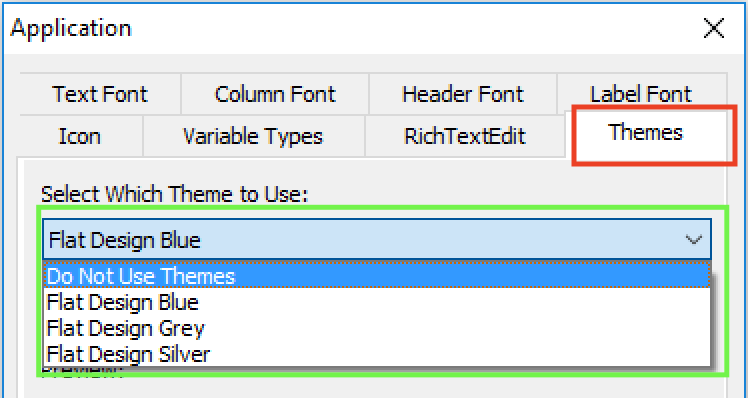
There is a new “Themes” tab added to the application object’s additional properties that allows you to specify whether to use this new feature, and if yes, what theme to use. Several pre-built themes are provided, but you can customize these themes or create your own. For details on how to do this please refer to the UI themes tutorial.
Below is an example of a PowerBuilder app with the “Flat Design Blue” theme applied. Besides the obvious difference in appearance compared to the Windows ’95 look that is common of many older PowerBuilder projects, this theme automatically enlarges the selected row in a DataWindow so it is easier to read. This is just one example of creating a better UX (arguably).
Of course, you could certainly manipulate the properties of PowerBuilder’s visual objects programmatically (using PowerScript). However, this would be more labor intensive to implement and costlier to maintain in the long run than using a style sheet to manage all these. Furthermore, you would not be able to achieve the same UI & UX as shown because the new UI theme feature allows you to control more properties of the visuals than through PowerScript manipulation. For example, you can control the color and style of the lines that divide columns in the DataWindows or sections of a graph. As another example, the TrackBar control, by adjusting several different properties, gets a major makeover. These examples mentioned are illustrated below.
UI themes are fully customizable and of course, you can create your own. To customize one of the pre-built themes you simply edit the theme’s style sheet Themes.json (in JSON format), which is located under C:\Program Files (x86)\Appeon\Shared\PowerBuilder\theme180\%theme%. Editing the theme’s style sheet is quite straightforward and intuitive. Here is a short code snippet of the “Flat Design Blue” Themes.json file:
Summary
This was the second time that Appeon had hosted a PowerBuilder user conference on their own, and once again I thought it went extremely well, even better than the prior year. As with the prior year, attendance was good and quite diverse.
Facility
The conference was held in the Sheraton Philadelphia Society Hill Hotel. As it is a hotel and in a popular area with a number of other hotels nearby, there was no need for Appeon to provide transportation to and from the conference location as was required last year.
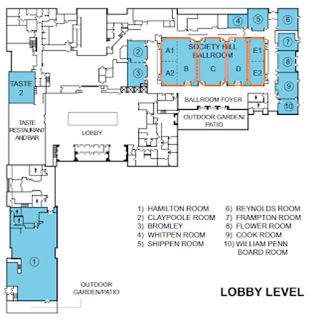
The meeting area was divided into four sections as highlighted in orange below: A&B (A1, A2 and B all combined), C, D and E (E1 and E2 combined). The keynotes were given in A&B and sessions were running concurrently in A&B, C, D and E. Breakfasts were provided in the Ballroom Foyer and lunches in the Hamilton Room.

This years Elevate 2018 Conference is now fast approaching so it is time to register to benefit from the significant amount of technical sessions scheduled. The technical sessions should be of interest no matter you are primarily maintaining an app or looking to elevate your apps to the next level. The conference itself this year is scheduled for November 5-7, 2018 in Philadelphia at the Sheraton Philadelphia Society Hill Hotel, and your registration fee covers the 60+ hours of technical sessions, breakfasts and lunches, and admission to a special evening networking event.
The conference will start out with an information-packed keynote address that will cover many exciting items about PB 2017 R3, the upcoming PB 2018, and the latest updates to the product roadmap. The keynote will also address the new C# features of PB 2018 with valuable information, such as:
How PowerBuilder 2018 fits in the .NET ecosystem?How PowerBuilder 2018 takes your apps to the cloud?How will PowerBuilder modernize the UI of your apps?What are the latest updates to the PowerBuilder roadmap?Many technical sessions are planned related to the key features and technologies of PB 2018 such as: .NET Core framework direction, n-tier REST based architecture, the new C# DataStore/ModelMapper, and so on. Following the keynote address, various daily technical sessions will commence focusing on hot topic areas such as: C# with PowerBuilder, Modernizing your UI/UX, Cloudify Existing App, Integration, Design & Best Practices, and Development Productivity. In between these sessions, you will be able to schedule time to meet one-on-one with the Appeon Product Team or Appeon staff to discuss your specific project questions or challenges.
Building on the excellent feedback from last years Elevate 2017 conference, you will be excited to hear that many of last years presenters will also be returning to Elevate 2018 to present fresh new topics for this year. On the Appeon side, the Elevate 2018 conference will also have the pleasure of key people from the Appeon Product Team, including Appeon CTO John Qi and Appeon product manager Julie Jiang, and of course other Appeon staff. Many of the returning conference presenters are also well-known Appeon MVPs such as: Bruce Armstrong, Marco Meoni, Michael Kramer, and Matt Balent, just to mention a few. There will also be a host of presentations from real-life Appeon customers who will educate you how they overcame project challenges or used new features of PowerBuilder.
The daily agenda will start with a continental breakfast at 8:00am followed by Education Sessions from 9:00am to 12:00pm, where afterwards lunch will be served. Following lunch, the Education Sessions will continue from 1:00pm through until 5:00pm. On the last day, the Education Sessions will conclude earlier at 3:00pm for those wanting to catch an early flight or drive back home.
PowerBuilder 2017 R3 contains a pleasant surprise for the PowerBuilder Universal Edition customers. Prior to this release of PowerBuilder, the Universal Edition included the PowerServer Mobile edition only. This meant that the developers were restricted to the building mobile (iOS and Android) apps only unless they purchased developer licenses of PowerServer. Beginning in R3 though, Appeon has now included both the PowerServer Mobile and Web development licenses (for .NET) within the Universal Edition installation. This now means that the PowerServer Toolkit, which is utilized from within the PowerBuilder IDE, can be used to also deploy PowerBuilder projects as Web apps to the provided development-use PowerServer, as follows:
Figure 1- PowerServer Toolkit project for Web and Mobile deployment
Aside from being able to convert existing projects to Web apps, another “hidden gem” that is included in PowerServer Web is a feature known as Installable Web Applications (IWA). IWA takes advantage of your application being web-deployable but replaces the Web browser with its own container known as the IWA Runner. The IWA Runner removes the dependency on the Web browser, including dependency on its configuration and permissions to install the web browser plugin. This makes it even easier and more seamless to deploy PowerServer Web apps to users. You get the same benefits of running in a Web browser, but you can access your apps like a typical desktop application. Specifically, IWA installs your web-based application as a Windows short-cut on the user’s machine. When the application user selects the application short-cut, the PowerServer Web application is downloaded just-in-time (JIT) to the client machine and executed.
Figure 2- Actual IWA application short-cut

Appeon has now fully resurrected the CodeXchange side of PowerBuilder-related resources for the developer community under the new Appeon Community website. Previously, the CodeXchange code samples were loosely housed underneath the main Appeon Website and “read-only”, which was not conducive for expanding the code examples, exchanging ideas about a particular code sample, or easily find code samples of interest. These limitations have now been addressed by housing the CodeXchange under the new Appeon Community website, as follows:
The new CodeXchange home allows for a much better code sample navigation and searching experience. It is better structured around the programming language and deployment targets you are interested in. It is easy to see if there are any new items and when the most recent activity occurred. You also have an advanced search functionality by clicking the “Search Code” button, as follows:
Figure 1- Advanced Search
When viewing a particular code sample, the new CodeXchange area now allows you to interact with the author and fellow developers. You can exchange ideas about or discuss the code sample by posting a reply. For example, you may want to ask the author a question or you may have suggestions for other Appeon Community users how to benefit from this code sample. And you can easily share the code sample with anybody by using the various sharing options, such as: email, Twitter, Facebook, Google, etc. interactions, as follows:
PowerBuilder 2017 R2, released in January 2018, added TLS 1.2 support in the new HTTP Client and RESTful Client components. Both objects have a property named SecureProtocol that can be set to a value of five (5) to ensure only TLS 1.2 protocol is utilized. TLS 1.2 takes advantage of the use of the higher SHA-256 encryption standard and the client and server’s ability to specify the accepted hash and signature algorithms. TLS 1.2 also supports authenticated encryption, TLS extensions, and AES cipher suites.
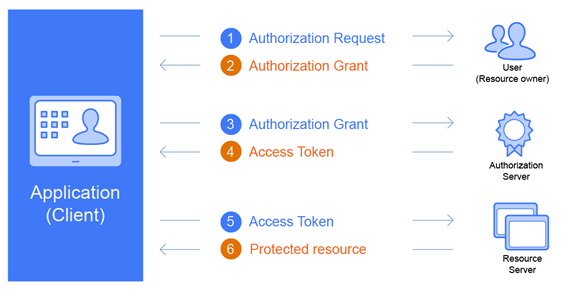
PowerBuilder 2017 R3, released in July 2018, upgrades PowerBuilder to support the new OAuth 2.0 specification – often just commonly referred to as OAuth2. With the inclusion of OAuth2 features, application developers and their resulting applications can take advantage of the security features of OAuth2. Before the average developer utilizes the new OAuth2 features of PowerBuilder, it helps if you understand the concepts behind the OAuth2 implementation.
OAuth2 is an authorization framework that enables applications to obtain limited access to user accounts on an HTTP service. Many popular third-party HTTP services use OAuth2, such as GitHub, Google, Facebook, etc. – just to name a few. OAuth2 works by delegating user authentication to the service that hosts the user account and authorizing third-party applications to access that user account. The OAuth2 system provides authorization flows for web, mobile and desktop applications. It does this by using four OAuth2 roles, which are: Resource Owner, Client, Resource Server and Authorization Server. The OAuth2 framework defines these roles as:
Resource Owner is the user who authorizes an application to access their account.Resource Server is the server hosting protected data (for example Google hosting your profile and personal information).Client is any application requesting access to a resource server. Before it may do so though, it must be authorized by the user, and the authorization must be validated.Authorization Server is a server issuing access token to the client. This token will be used for the client to request the resource server. This server can be the same as the authorization server (same physical server and same application) as this is often the case.
High Level Flow

Given that this was the first conference that Appeon had hosted, I thought it went extremely well. There were a few areas for improvement, which I will address at the end of this article.
Attendance was good and diverse. It seemed like there were a significant number of people attending from outside of the United States. (Appeon later indicated that 24% of the attendees were from outside North America, 4% from Asia, and 10% each from Europe and Latin America). There was a lot of energy and excitement on the attendees part, and the sessions overall appeared to have been high quality and well attended. The facilities were great, if a bit small, and the services provided by Appeon to facilitate travel between the downtown hotels and the conference location were a great touch. If you didn't attend this year I would highly recommend it next year, particularly given we should have some exciting new 2018 features to see next year.
FacilityThe conference was held Sept 25th through 27th at the Harris Conference Center in Charlotte, NC. The facility is located on the campus of the Central Piedmont Community College, just a few miles from the Charlotte Douglas International airport. Most of the attendees stayed at the Holiday Inn in downtown Charlotte or other downtown hotels. Appeon provide shuttle busses that ran every 30 minutes between the Holiday Inn and the conference center at the beginning and end of each day of the conference.The keynote, lunches and some sessions were held in the Full Conference Hall. Other sessions were run simultaneously in the Ash, Birch, Cypress and Maple conference rooms.
RegistrationI'm used to conferences that allow registration the day before the conference begins. Such was not the case here. Instead registration opened at 8:00 the first day of the conference and the keynote didn't begin until 9:30, but the registration went smoothly.BreakfastsDuring registration and each morning the next two days breakfast was offered. It was the standard carbs and fruit offering typical for such events. Doesn't quite fit my diet so I made other arrangements, but most other attendees seemed content.